Frequently Asked Questions
Accounts and Password Issues
- 1) Why do I need a CometMarks account?*
CometMarks account is for you to manage your own bookmarks, you'll need this account because:
- You use more than one operation systems/computers and you want to have the same bookmarks on them.
- You would like to have access to your own bookmarks whenever you are.
- Never lose your bookmarks when you install a new web browser or operating system.
- 2) Does my Comet Passport work at cometmarks.com?*
Yes! Comet Passport is an account system that can be used in BitComet and all its relevant products and websites. With Comet Passport, you will not only get a better downloading speed, but also the access to all relevant websites without registration; although the registration is easy and free. Click HERE to create a Comet Passport Now.
- 3) Can I delete my CometMarks account?*
Your Comet Passport can not be deleted, and you cannot change your email or username once they're verified, but you can change your password from here.
- 4) How to change my password?*
You can reset your password from www.cometid.com, an email will be sent to your registered mailbox (the email address will be shown on the screen), then you can reset your password and retrieve your username by following the instructions. The link in the email is temporary and will expire in 24 hours,hence you'll find the link not working if you access after 1 day. And you can only request to reset your password once a day.
Please note, if you don’t receive the password replacement email, please check your junk mail box, sometimes mailboxes mistakenly categorise emails from unknown senders.
Installation Issues
- 1) What's the system requirement to install CometMarks?*
You can download CometMarks if you are running Microsoft Windows operating system, and using one of the most popular browsers namely cometbird, firefox, and IE. CometMarks is compatible to these Browsers and will support other popular browsers in future versions.
- 2) Is CometMarks free?*
Definitely Yes! CometMarks is a new, innovative, professional and TOTALLY FREE.
- 3) Why can't I uninstall CometMarks from IE add-ons manager?*
By clicking Manage Add-ons in IE toolbar, you can only disable the CometMarks options in the Add-ons drop-down menu. You can remove CometMarks in the Control panel, for more details, please read Uninstalling CometMarks.
- 4) Do I need to reinstall CometMarks when there is a upgraded version?*
No. You'll be notified when updates are available; you'll get the latest version by follow the instructions.
Bookmarks management issues
-
1) How to edit my bookmarks folder?*
-
If you're using IE, please read the instructions here.
-
If you're using Firefox or CometBird, please read the instructions here.
-
2) The delete button does not work when I click it, what's the problem?*
Please select the target you want to delete before press the button. If the problem still occurs, click "Save Bookmarks" before your action complete.
- 3) I accidentally deleted a file, can I restore it?*
You'll be able to restore the file as long as you haven't clicked the "Save Bookmarks" button, refresh the browser and your bookmarks folders will appear without any changes.
- 4) How to search a bookmark I collected in the bookmarks folder?*
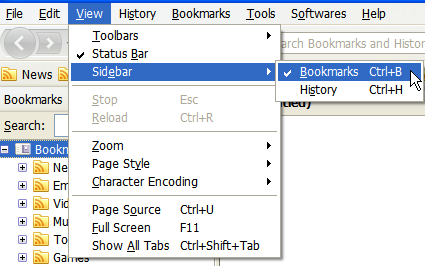
- Select "View" on the menu bar, click "Sidebar" --> "Bookmarks", then enter the keywords you want to search in the search bar. Or
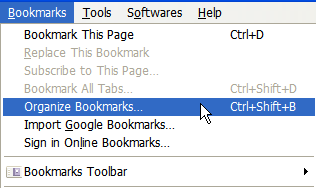
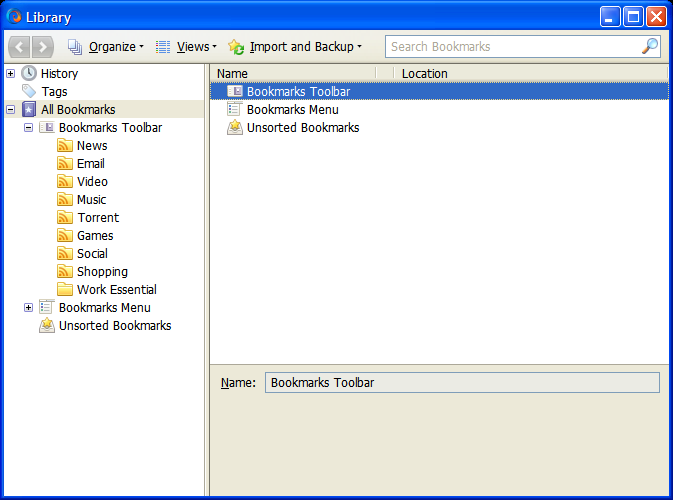
- Display the Library window by clicking on the Bookmarks menu and select Organize Bookmarks.... The Library window will appear. Enter the site name or description in the search bar to find your target bookmark.
Synchronization issues
- I've made changes in "My CometMarks", but they were not synchronized to my other computers. What's the problem?*
Please make sure that your CometMarks is in working status on your other computer. If you disabled it or did not login your CometMarks account, the synchronization will not be able to work. There are the 2 solutions:
- Check whether the icon is in bright colour (
 is known as bright and
  is known as dark). If not, that means your CometMarks is inactive, right-click the icon to login from "settings" and the synchronization will start.
 - Select "Tools" in menu bar, go to "Add-ons" to check CometMarks' status; and click "enable" if it's disabled.